





CentOS需先启用EPEL源再安装Nginx:CentOS 7用yum install epel-release,CentOS 8/Stream用dnf install epel-release;随后安装nginx并启用开机自启;配置防火墙放行80端口,验证语法后即可访问欢迎页。
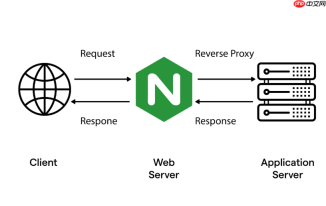
CentOS 默认仓库中不包含 Nginx,需先启用 EPEL(Extra Packages for Enterprise Linux)源,再通过 yum 安装官方编译好的稳定版 Nginx。整个过程简单可靠,适合生产环境快速部署。
添加 EPEL 源
EPEL 是由 Fedora 社区维护的高质量附加软件包仓库,兼容 CentOS。执行以下命令安装 EPEL 仓库:
- CentOS 7:sudo yum install epel-release -y
- CentOS 8/Stream:sudo dnf install epel-release -y(注意:CentOS 8 默认使用 dnf)
安装完成后,可运行 yum repolist(或 dnf repolist)确认 epel 已出现在可用仓库列表中。
安装并启动 Nginx
启用 EPEL 后,直接安装 Nginx:
- sudo yum install nginx -y(CentOS 7)
- sudo dnf install nginx -y(CentOS 8/Stream)
安装完毕后,启动服务并设为开机自启:
- sudo systemctl start nginx
- sudo systemctl enable nginx
用 curl http://localhost 或在浏览器访问服务器 IP,看到 “Welcome to nginx!” 页面即表示安装成功。
基础配置与防火墙放行
Nginx 主配置文件位于 /etc/nginx/nginx.conf,网站根目录默认为 /usr/share/nginx/html。如需修改监听端口、域名或静态路径,编辑该文件即可。
若无法从外部访问,检查是否开启防火墙并放行 HTTP(80)端口:
- CentOS 7(firewalld):sudo firewall-cmd --permanent --add-service=http && sudo firewall-cmd --reload
- CentOS 8(同样适用 firewalld):sudo firewall-cmd --add-port=80/tcp --permanent && sudo firewall-cmd --reload
SELinux 默认允许 Nginx 访问标准端口,一般无需额外配置;如遇 403 错误且确认权限无误,可临时检查 SELinux 状态:getenforce,必要时用 setsebool -P httpd_can_network_connect 1 开放网络连接权限。
验证与常用管理命令
安装后建议验证配置语法是否正确:
- sudo nginx -t —— 输出 “syntax is ok” 和 “test is successful” 表示配置无误
- sudo systemctl reload nginx —— 平滑重载配置(不中断连接)
- sudo systemctl status nginx —— 查看运行状态和最近日志
日志默认存放在 /var/log/nginx/ 目录下,access.log 和 error.log 是排查问题的关键依据。


