





用nginx反向代理是解决next.js跨域问题最稳妥的生产方案,通过统一域名出口、将/api/路径代理至后端,使浏览器始终与同一源通信,无需改前端代码或后端加cors头。
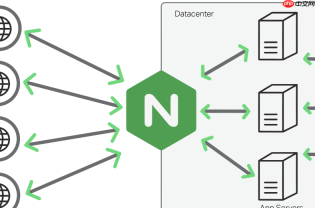
用 Nginx 做反向代理是解决 Next.js 应用中接口跨域(CORS)报错最稳妥、生产环境推荐的方式。它不依赖前端代码改写或后端加 CORS 头,而是让浏览器认为所有请求都发往同一域名,从根本上规避浏览器同源策略限制。
核心思路:统一域名出口
Next.js 默认运行在 http://localhost:3000,而你的 API 接口可能在 http://localhost:8080 或 https://api.example.com。浏览器因协议、端口或域名不同直接拦截请求。Nginx 通过把 /api/ 路径的请求代理到后端服务,让前端仍访问 http://localhost:3000/api/xxx,实际由 Nginx 转发并返回结果——对浏览器而言,全程只和一个源通信。
Nginx 配置关键项(本地开发示例)
假设你本地启动了:
- Next.js 开发服务器:
http://localhost:3000 - 后端 API 服务:
http://localhost:8080
在 /etc/nginx/conf.d/nextjs.conf 中写入:
server {
    listen       80;
    server_name  localhost;
<pre class="brush:php;toolbar:false;">location / {
    proxy_pass http://localhost:3000;
    proxy_http_version 1.1;
    proxy_set_header Upgrade $http_upgrade;
    proxy_set_header Connection 'upgrade';
    proxy_set_header Host $host;
    proxy_set_header X-Real-IP $remote_addr;
    proxy_set_header X-Forwarded-For $proxy_add_x_forwarded_for;
    proxy_set_header X-Forwarded-Proto $scheme;
}

# 关键:把所有 /api/ 开头的请求代理到后端
location /api/ {
    proxy_pass http://localhost:8080/;
    proxy_http_version 1.1;
    proxy_set_header Host $host;
    proxy_set_header X-Real-IP $remote_addr;
    proxy_set_header X-Forwarded-For $proxy_add_x_forwarded_for;
    proxy_set_header X-Forwarded-Proto $scheme;
}
}
⚠️ 注意:proxy_pass 末尾的 / 很重要。写成 http://localhost:8080/ 会自动剥离 /api/ 前缀再转发(例如 /api/users → 后端收到 /users),避免后端路由匹配失败。
Next.js 前端调用方式保持简洁
无需加 withCredentials 或手动设 header,直接用相对路径发起请求:
// pages/index.js 或 app/page.tsx 中
const res = await fetch('/api/users'); // ✅ 浏览器发给 localhost:80,Nginx 拦截并转给 8080
const data = await res.json();
这样既不用在 getServerSideProps 或 getStaticProps 里绕过浏览器限制,也不用在客户端硬编码后端地址,便于多环境切换。
生产环境补充建议
- 若部署在域名下(如
https://myapp.com),确保 Nginx 的server_name和 SSL 配置正确,并把proxy_pass指向真实后端地址(如https://api.myapp.com) - 如需透传 Cookie 或认证头,添加
proxy_set_header X-Forwarded-Host $host;和proxy_cookie_path / "/"; - 后端无需额外开启 CORS(除非你还想支持直接跨域调用),Nginx 已完成“同源伪装”
不复杂但容易忽略:每次改完 Nginx 配置记得执行 sudo nginx -t && sudo systemctl reload nginx 生效。


