





Nginx proxy_cache可缓存Next.js SSR响应以缓解高并发压力;需配置cache_path、精准匹配SSR路径、设置cache_key与bypass规则,并通过X-Cache头验证命中状态。
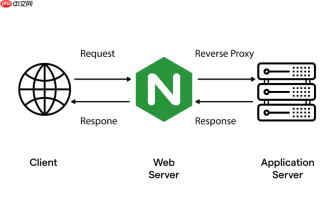
Next.js 的服务端渲染(SSR)页面在高并发下容易成为性能瓶颈,直接由 Node.js 服务处理每个请求会消耗大量 CPU 和内存。Nginx 的 proxy_cache 可以在反向代理层缓存 SSR 响应,显著降低后端压力、提升首字节时间(TTFB),且对用户完全透明。
启用 proxy_cache 的基础配置
Nginx 默认不启用缓存,需先定义缓存区并启用代理缓存功能:
在 http 块中添加:
proxy_cache_path /var/cache/nginx/nextjs levels=1:2 keys_zone=nextjs:10m max_size=1g inactive=60m use_temp_path=off;
说明:
-
keys_zone=nextjs:10m:声明名为nextjs的共享内存区,10MB 可存储约 8 万条缓存键 -
inactive=60m:缓存项若 60 分钟内未被访问,自动清理(非 TTL,不依赖响应头) -
use_temp_path=off:避免临时文件拷贝,提升写入效率
针对 Next.js SSR 路由精准缓存
Next.js 的 SSR 页面通常对应动态路由(如 /blog/[slug])、getServerSideProps 页面或带查询参数的路径。需谨慎设置缓存策略,避免缓存个性化内容:
- 只缓存明确允许的 SSR 路径,例如
/、/about、/blog/.*,排除/api/、/_next/、登录态相关路径 - 使用
proxy_cache_bypass和proxy_no_cache避免缓存含 Cookie 或认证头的请求(如已登录用户) - 用
proxy_cache_key去除无关查询参数(如?utm_source=xxx),防止缓存碎片化
示例 server 块片段:
location ~ ^/(|about|blog/|products/|news/) {
    proxy_cache nextjs;
    proxy_cache_valid 200 301 302 10m;
    proxy_cache_valid 404 1m;
    proxy_cache_use_stale error timeout updating http_500 http_502 http_503 http_504;

    proxy_cache_bypass $http_cookie $arg_nocache;
    proxy_no_cache $http_cookie $arg_nocache;

    proxy_cache_key "$scheme$request_method$host$uri";

    proxy_pass http://nextjs_backend;
    proxy_set_header Host $host;
    proxy_set_header X-Real-IP $remote_addr;
}
控制缓存生命周期与刷新机制
Next.js 不像纯静态站点能靠文件哈希失效缓存,SSR 内容更新依赖业务逻辑触发:
- 在构建部署后,可通过
proxy_cache_purge模块主动清空指定缓存(需编译 Nginx 时启用--with-http_stub_status_module --with-http_v2_module --with-http_realip_module --with-http_ssl_module --with-http_gzip_static_module --with-http_sub_module --with-http_slice_module --with-http_stub_status_module --with-stream --with-mail --with-http_v2_module --with-http_realip_module --with-http_ssl_module --with-http_gzip_static_module --with-http_sub_module --with-http_slice_module --with-http_stub_status_module --with-stream --with-mail --with-http_v2_module --with-http_realip_module --with-http_ssl_module --with-http_gzip_static_module --with-http_sub_module --with-http_slice_module --with-http_stub_status_module --with-stream --with-mail并加载ngx_http_proxy_cache_purge_module) - 更轻量的做法是结合
Cache-Control: no-cache响应头,在 Next.js 页面中按需返回该头(如管理后台页面),由 Nginx 尊重后端指令跳过缓存 - 对时效敏感的页面(如实时数据页),可设较短
proxy_cache_valid(如 30s),兼顾新鲜度与性能
验证与调试缓存是否生效
上线前务必确认缓存行为符合预期:
- 检查响应头:成功命中缓存时,Nginx 会添加
X-Cache: HIT;未命中为X-Cache: MISS;绕过缓存为X-Cache: BYPASS(需在配置中添加add_header X-Cache $upstream_cache_status;) - 查看缓存目录:
ls -la /var/cache/nginx/nextjs/应有层级子目录和数据文件 - 用
nginx -t校验语法,nginx -s reload热更新配置,避免中断服务 - 注意:本地开发环境(
next dev)不适用此方案,仅用于next start启动的生产服务


