






在 Nginx 中为目录启用 CORS 需在 location 块中用 add_header 设置 Access-Control-Allow-Origin 等响应头,并显式处理 OPTIONS 预检请求,返回 204 状态码及带 always 参数的 CORS 头;注意 Origin 为 * 时不可设 Allow-Credentials 为 true。
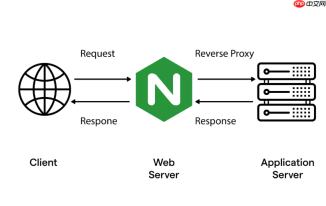
要在 Nginx 中为某个目录(或 location)开启跨域支持(CORS),核心是通过 add_header 指令正确设置响应头,尤其注意 Access-Control-Allow-Origin 等关键字段,并处理预检请求(OPTIONS)。
配置 location 块启用 CORS 响应头
在对应目录的 location 块中添加标准 CORS 头。例如,为 /api/ 路径开启跨域:
location /api/ {
    add_header 'Access-Control-Allow-Origin' '*';
    add_header 'Access-Control-Allow-Methods' 'GET, POST, OPTIONS, PUT, DELETE';
    add_header 'Access-Control-Allow-Headers' 'DNT,User-Agent,X-Requested-With,If-Modified-Since,Cache-Control,Content-Type,Range,Authorization';
    add_header 'Access-Control-Expose-Headers' 'Content-Length,Content-Range';
    add_header 'Access-Control-Allow-Credentials' 'true';
<pre class="brush:php;toolbar:false;"># 其他 proxy_pass 或 root 配置...
}
注意:Access-Control-Allow-Origin 设为 * 时,Access-Control-Allow-Credentials 必须为 false,否则浏览器会拒绝响应。如需携带 Cookie 或认证信息,必须指定明确的源(如 https://example.com),不能用通配符。
显式处理 OPTIONS 预检请求
浏览器对非简单请求(如带自定义 Header 或非 GET/POST 方法)会先发一个 OPTIONS 请求。Nginx 默认不处理它,需手动返回 204 响应:
- 在对应 location 内添加
if ($request_method = 'OPTIONS')判断 - 返回空响应体 + 204 状态码 + 所有 CORS 头
- 用
add_header设置头后,需加always参数,否则 Nginx 在 204 响应中默认不发送自定义头
示例:
location /api/ {
    if ($request_method = 'OPTIONS') {
        add_header 'Access-Control-Allow-Origin' 'https://example.com' always;
        add_header 'Access-Control-Allow-Methods' 'GET, POST, OPTIONS, PUT, DELETE' always;
        add_header 'Access-Control-Allow-Headers' 'DNT,User-Agent,X-Requested-With,If-Modified-Since,Cache-Control,Content-Type,Range,Authorization' always;
        add_header 'Access-Control-Allow-Credentials' 'true' always;
        add_header 'Access-Control-Max-Age' 17280000 always;
        add_header 'Content-Type' 'text/plain; charset=utf-8' always;
        add_header 'Content-Length' 0 always;
        return 204;
    }
<pre class="brush:php;toolbar:false;"># 正常请求处理(如 proxy_pass)
proxy_pass http://backend;
proxy_set_header Host $host;
# ...其他代理配置
}
避免重复添加头与继承问题
Nginx 的 add_header 不会继承上级作用域,且同级多个 add_header 会覆盖而非合并。要注意:
- 不要在
server块里全局加 CORS 头,除非所有路径都允许跨域 - 同一 location 中重复写
add_header同一名字,只有最后一个生效 - 若使用了
proxy_pass,确保后端不冲突地覆盖这些头;必要时用proxy_hide_header屏蔽后端返回的 CORS 头
验证是否生效
重启 Nginx 后,用 curl 测试响应头:
curl -I -X OPTIONS https://yourdomain.com/api/test \
  -H "Origin: https://example.com" \
  -H "Access-Control-Request-Method: POST"
检查输出中是否包含 Access-Control-Allow-Origin、Access-Control-Allow-Methods 等字段。也可在浏览器开发者工具的 Network 面板中查看响应头。


