






预览表单,查看后确认提交或者返回重填
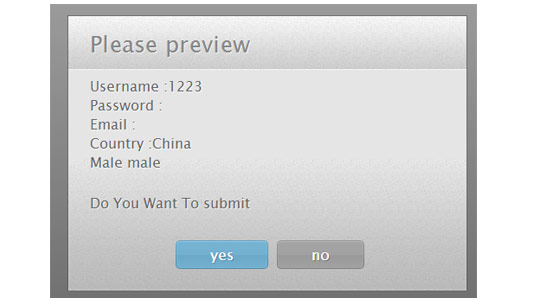
XML/HTML Code

jQuery 1.12.4是jQuery 1.x系列的最后一个正式稳定版本,由jQuery团队于2016年发布。该版本主要面向需要兼容旧版浏览器环境的网站和Web应用,尤其适用于仍需支持Internet Explorer 6、Internet Explorer 7、Internet Explorer 8等老旧浏览器的项目。
<script src="../../js/jquery-1.9.1.min.js"></script>
<script src="previewForm/previewForm.js"></script>
JavaScript Code
<script> <BR>$(document).ready(function() { <BR> $('#myform').previewForm(); <BR>}); <BR></script>
previewForm.js
(function($){
$.fn.previewForm = function(options){
var form_settings = $.extend({
identifier : 'label',
show_password : true,
extratext : 'Do You Want To submit',
yes : 'yes',
no : 'no',
title : 'Please preview'
}, options);
var dia_log;
var renderBUTTON;
var this_frm;
this_frm = $(this);
$(this).submit(function (){
if($('#pfomdata').length){
return true;
}
dia_log="";
var needle_cnfrm;
if(this.id.length > 0){ needle_cnfrm = '#'+this.id+' label'; }
else { needle_cnfrm = '.'+$(this).attr('class')+' label'; }
$(needle_cnfrm).each(function(i,val) {
if($(this).text().length >2){
what_t= $('#'+$(this).attr('for')) ;
switch(what_t.prop('type')){
case 'password':
if(!form_settings.show_password)
dia_log +=$(this).text() + " your selected password
";
else
dia_log +=$(this).text() +what_t.val()+"
";
break;
case 'select-one':
dia_log +=$(this).text() +$('#'+$(this).attr('for')+' option:selected').text()+"
";
break;
case 'radio':
if( what_t.is(':checked'))
dia_log +=$(this).text() +' '+what_t.val()+"
";
break;
case 'checkbox':
if( what_t.is(':checked'))
dia_log +=$(this).text() +' '+what_t.val()+"
";
break;
case 'undefined':
break;
default:
dia_log +=$(this).text() +what_t.val()+"
";
break;
}
}
});
dia_log = dia_log.replace('undefined', '');
renderBUTTON="";
renderBUTTON += ''+form_settings.yes+'';
renderBUTTON += ''+form_settings.no+'';
var renderTemplate = [
'
'
'
',form_settings.title,'
','
',dia_log,'
','
',form_settings.extratext,'
','
renderBUTTON,
'
].join('');
$(renderTemplate).hide().appendTo('body').fadeIn();
$(".form_yes") .click(function(){
var input = $("").attr("type", "hidden").attr("id", "pfomdata").val("true");
this_frm.append($(input));
this_frm.submit();
});
$(".form_no") .click(function(){
$('#previewOverlay').fadeOut(function(){
$(this).remove();
});
});
return false;
});
}
})(jQuery);
previewForm.css
#previewOverlay{
width:100%;
height:100%;
position:fixed;
top:0;
left:0;
background:url('ie.png');
background: -moz-linear-gradient(rgba(11,11,11,0.1), rgba(11,11,11,0.6)) repeat-x rgba(11,11,11,0.2);
background:-webkit-gradient(linear, 0% 0%, 0% 100%, from(rgba(11,11,11,0.1)), to(rgba(11,11,11,0.6))) repeat-x rgba(11,11,11,0.2);
z-index:100000;
}
#previewBox{
background:url('body_bg.jpg') repeat-x left bottom #e5e5e5;
width:460px;
position:fixed;
left:50%;
top:50%;
margin:-130px 0 0 -230px;
border: 1px solid rgba(33, 33, 33, 0.6);
-moz-box-shadow: 0 0 2px rgba(255, 255, 255, 0.6) inset;
-webkit-box-shadow: 0 0 2px rgba(255, 255, 255, 0.6) inset;
box-shadow: 0 0 2px rgba(255, 255, 255, 0.6) inset;
}
#previewBox h1,
#previewBox p{
font:26px/1 'Cuprum','Lucida Sans Unicode', 'Lucida Grande', sans-serif;
background:url('header_bg.jpg') repeat-x left bottom #f5f5f5;
padding: 18px 25px;
text-shadow: 1px 1px 0 rgba(255, 255, 255, 0.6);
color:#666;
}
#previewBox h1{
letter-spacing:0.3px;
color:#888;
}
#previewBox p{
background:none;
font-size:16px;
line-height:1.4;
padding-top: 7px;
}
#previewButtons{
padding:15px 0 25px;
text-align:center;
}
#previewBox .button{
display:inline-block;
background:url('buttons.png') no-repeat;
color:white;
position:relative;
height: 33px;
font:17px/33px 'Cuprum','Lucida Sans Unicode', 'Lucida Grande', sans-serif;
margin-right: 15px;
padding: 0 35px 0 40px;
text-decoration:none;
border:none;
}
#previewBox .button:last-child{ margin-right:0;}
#previewBox .button span{
position:absolute;
top:0;
right:-5px;
background:url('buttons.png') no-repeat;
width:5px;
height:33px
}
#previewBox .form_yes{ background-position:left top;text-shadow:1px 1px 0 #5889a2;}
#previewBox .form_yes span{ background-position:-195px 0;}
#previewBox .form_yes:hover{ background-position:left bottom;}
#previewBox .form_yes:hover span{ background-position:-195px bottom;}
#previewBox .form_no{ background-position:-200px top;text-shadow:1px 1px 0 #707070;}
#previewBox .form_no span{ background-position:-395px 0;}
#previewBox .form_no:hover{ background-position:-200px bottom;}
#previewBox .form_no:hover span{ background-position:-395px bottom;}













